How to develop your own file system
The implementation of a file system consists of the following parts as can be seen in the following picture:
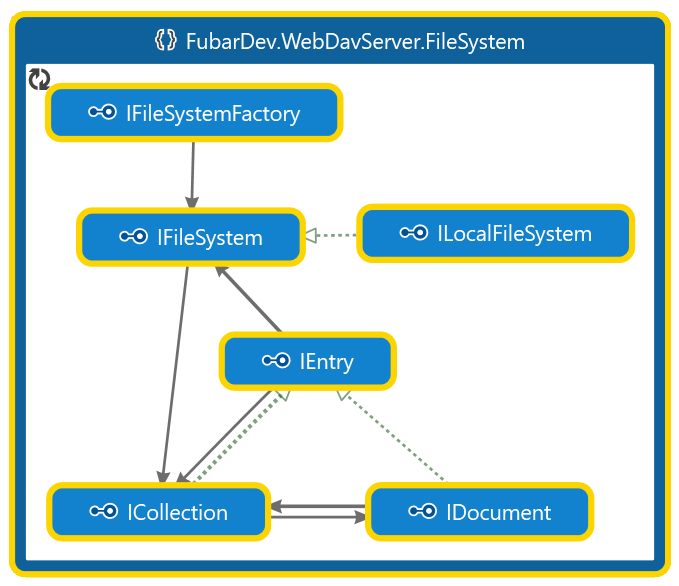
The order in which a file system gets implemented should be:
- The IFileSystemFactory
- The IFileSystem
- The ICollection
- The IDocument
The IEntry is the base for both the ICollection and IDocument. It depends on the underlying data source and the developers preferences if there should be a base class for IEntry or if the shared functionality should be implemented separately for both ICollection and IDocument.
Due to the limitation of the dependency injection frameworks it's not possible to use async/await during the resolve operation of a DI container, which is the main reason that IFileSystem.Root is an AsyncLazy for the root collection. This allows the lazy loading of the root collection at a later time.
IFileSystemFactory
The IFileSystemFactory should be kept very simple. It usually takes the same parameters as its IFileSystem implementation, because those parameters must be passed to the IFileSystem implementation.
The implementation usually requires implementations of:
-
The path traversal engine is used to - as the name already suggests - traverse the path given by the client. It usually gets passed directly to the IFileSystem implementation to be returned by the IFileSystemFactory.CreateFileSystem function.
-
The property store factory gets usually passed directly to the IFileSystem implementation, because a property store needs to be instantiated for every file system. The underlying storage for a property store might be shared across multiple file systems (and therefore across multiple property stores).
-
The lock manager is - usually - a singleton in the WebDAV server, but it also might be registered as "instance per scope". It is important to realize that the locks are stored using the clients path. This path might have to be converted to some kind of global path by overriding LockManagerBase.NormalizePath.
IFileSystem
The file system provides the following information:
- The root ICollection
- The IPropertyStore
- The ILockManager
An implementation of IPathTraversalEngine is used to implement the IFileSystem.SelectAsync function.
Implementation of IFileSystem
-
This is the ILockManager to be used for this file system.
-
This is the IPropertyStore to be used for this file system for dead properties and - optionally - for entity tags if the file system doesn't support them natively.
-
This is the lazily evaluated root collection for this file system.
IFileSystem.SupportsRangedRead
This property returns
truewhen the streams for a document support seeking and partial reading. This is required for aGETwith ranges.-
This function returns a result for a search operation for the given path. The result always contains the last found collection and some other information. The easiest implementation just calls IPathTraversalEngine.TraverseAsync for the implementation of IPathTraversalEngine passed to the constructor of this file system implementation.
Additional interfaces
ILocalFileSystem
A file system might optionally implement the ILocalFileSystem interface. This interface can be used to determine the path where the file system is mapped to.
ILocalFileSystem.HasSubfolders
This property must return
truewhen this file system is a 1:1 mapping to a real file system. In contrast, a virtual file system that is stored inside a database file (e.g. SQLite), must return false, because the location of the DB file is known, but it doesn't have sub folders.ILocalFileSystem.RootDirectoryPath
This property returns the starting point of the file system or - in case of a virtual database backed file system - the location of the database file directory (read: the path without the database file name). Its value might be in any form that the host operation system understands, like e.g. UNC paths on Windows.
IMountPointManager
The IMountPointManager interface enables mount point support. It enables scenarios where the in-memory file system is used to provide a virtual read-only file system where the collections point to other file systems.
The IMountPointManager inherits from IMountPointProvider, because the manager also allows querying all the configured mount points.
IMountPointProvider.MountPoints
This property returns all mount points. This function must return an enumeration of URIs that are relative to the root file system and not the file system those mount points are configured for. This function is not used (yet) by the WebDAV server and is only available for WebDAV extensions.
Important
The enumeration must not change when a different thread changes the mount points!
IMountPointProvider.TryGetMountPoint
This function is used to return the destination file system for the given path - if a file system is mounted at the given path.
-
This function is used to add a file system for a given mount point. The path must point to an existing collection.
-
This function is used to remove a mount point.
An example can be found in the unit tests. The in-memory file system implements this interfaces.
Caution
The paths for the mount point manager and provider are always absolute paths (i.e. relative to the root file system)!
ICollection
A collection maps to a file system directory and is used to determine or create its child elements (either collections or documents).
A collection must support the following methods in addition to the IEntry interface:
ICollection.CreateCollectionAsync
This function creates a child collection with the given name.
ICollection.CreateDocumentAsync
This function creates a document with the given name within the current collection.
-
This function is used to get the child element (either a collection or document). The given name must not be interpreted as mask for the child entry name and - according the the WebDAV RFC - it must be case-insensitive.
Note
Even though the WebDAV server must be case-insensitive, it might not be that easy to implement - especially when the underlying file system is case-sensitive. In reality, this shouldn't be a problem, because all WebDAV clients use the file names as returned by the PROPFIND and there is never a file mask used for filtering the collections items.
-
This function is used to get all children for a given collection. During path traversal, only the ICollection.GetChildAsync function is used. This allows a faster path traversal to the destination element.
IDocument
The document maps to a file in a file system and is mainly used to read or write its content and to copy or move the file (within the same file system).
A document must support the following properties and methods in addition to the IEntry interface:
-
Returns the length of the document. This is required for the live property getcontentlength.
-
This function is used to copy a document to a new location within the same file system.
-
This function is used to move a document to a new location within the same file system.
-
This function is used to open a writeable stream used to replace the documents content.
-
This function is used to open a stream to read the documents content.
Note
When IFileSystem.SupportsRangedRead returns
true, then the stream must be seekable.
IEntry
The base interface of ICollection and IDocument provides common information shared between a document and a collection, like its name, parent, creation date, etc...
-
Returns the name of the collection or document.
-
Returns the full path of the collection or document.
Tip
The path of a collection always ends in a slash (
/). -
The collection that this entry is part of.
Note
The root collection returns
nullfor the parent collection. -
The file system that this entry is part of.
Warning
This file system might be different from the root file system when the this file system is mounted using the root file systems IMountPointManager implementation.
-
This property must return the creation time as UTC.
-
This property must return the modification time as UTC.
-
Deletes the given entry.
Caution
When this function gets called on a collection, then the collection and all its children must be deleted recursively!
IEntry.SetCreationTimeUtcAsync
Sets the entries creation time as UTC.
IEntry.SetLastWriteTimeUtcAsync
Sets the entries modification time as UTC.